3D Printed Gifts: 8 Personalised Ideas From a Name, a Photo or a Place
Eight personalised 3D printed gifts made from a name, a photo or a place, with sizes, print settings and the free browser tool that makes each file.
By Depthue Lab8 min read
On this page (11 sections)
- Pick a gift by who it is for
- 1. A photo lithophane they can light up
- 2. A name sign or desk plate
- 3. A name keychain
- 4. A QR plaque that opens a video message
- 5. A 3D map of a place that matters
- 6. A photo relief of a pet or a face
- 7. A Gridfinity drawer set for the tinkerer
- 8. Two-colour ornaments for the tree
- Finish it so it looks bought
- Before you print a batch
The best 3D printed gifts are made for one person: their name, a photo of them, or a place they love. Each of the eight ideas below takes one free tool on this site to make the file, with the size and print settings to start from. Every tool runs in your browser, so nothing is uploaded. This page is for people with a printer at home.
Pick a gift by who it is for
| Gift | Made from | Suits | Colours | Free tool |
|---|---|---|---|---|
| Photo lithophane | A photo | Parents, grandparents, partners | 1 (white) | Lithophane maker |
| Name sign or desk plate | A name | Coworkers, teachers, kids' rooms | 1 or 2 | 3D text generator |
| Name keychain | A name | Friends, stocking fillers | 1 or 2 | 3D text generator |
| QR plaque | A link | Family far away, hosts (Wi-Fi) | 2 | 3D QR code generator |
| 3D map | A place | Couples, hikers, travellers | 1 | 3D map generator |
| Photo relief | A photo | Pet owners | 1 | Depth map generator |
| Gridfinity drawer set | A drawer size | Tinkerers, makers | 1 | Gridfinity layout tool |
| Two-colour ornament | A name or a greeting | Anyone at Christmas | 2 | Free ornament files |
Treat the "Suits" column as a starting point. A 3D map of a home town works for a grandparent too.
1. A photo lithophane they can light up
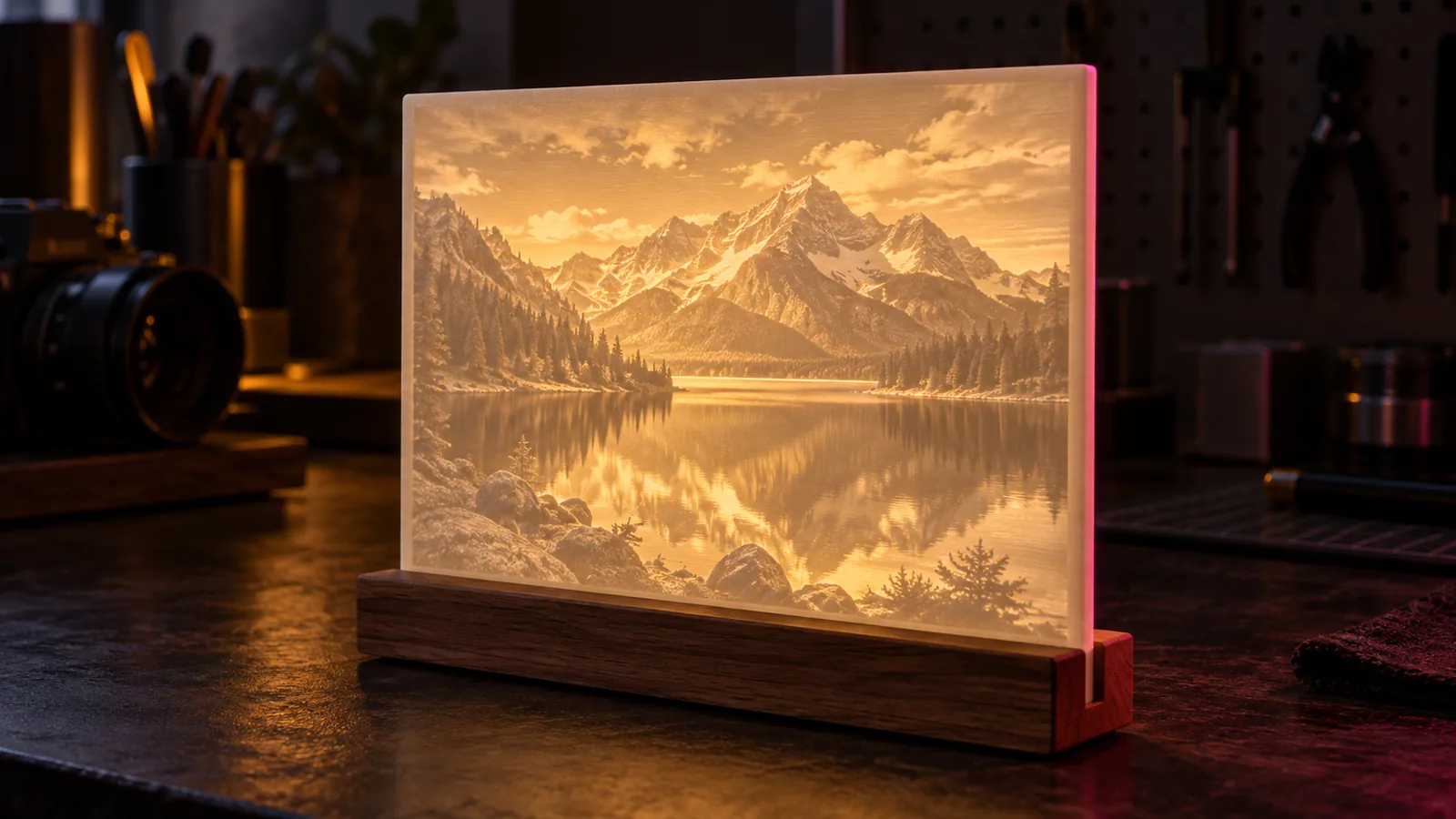
A lithophane is a thin print that shows a photo when light shines through it. Dark areas print thick and block the light, bright areas print thin and glow. It needs nothing but white filament.
Flat, curved or a lamp
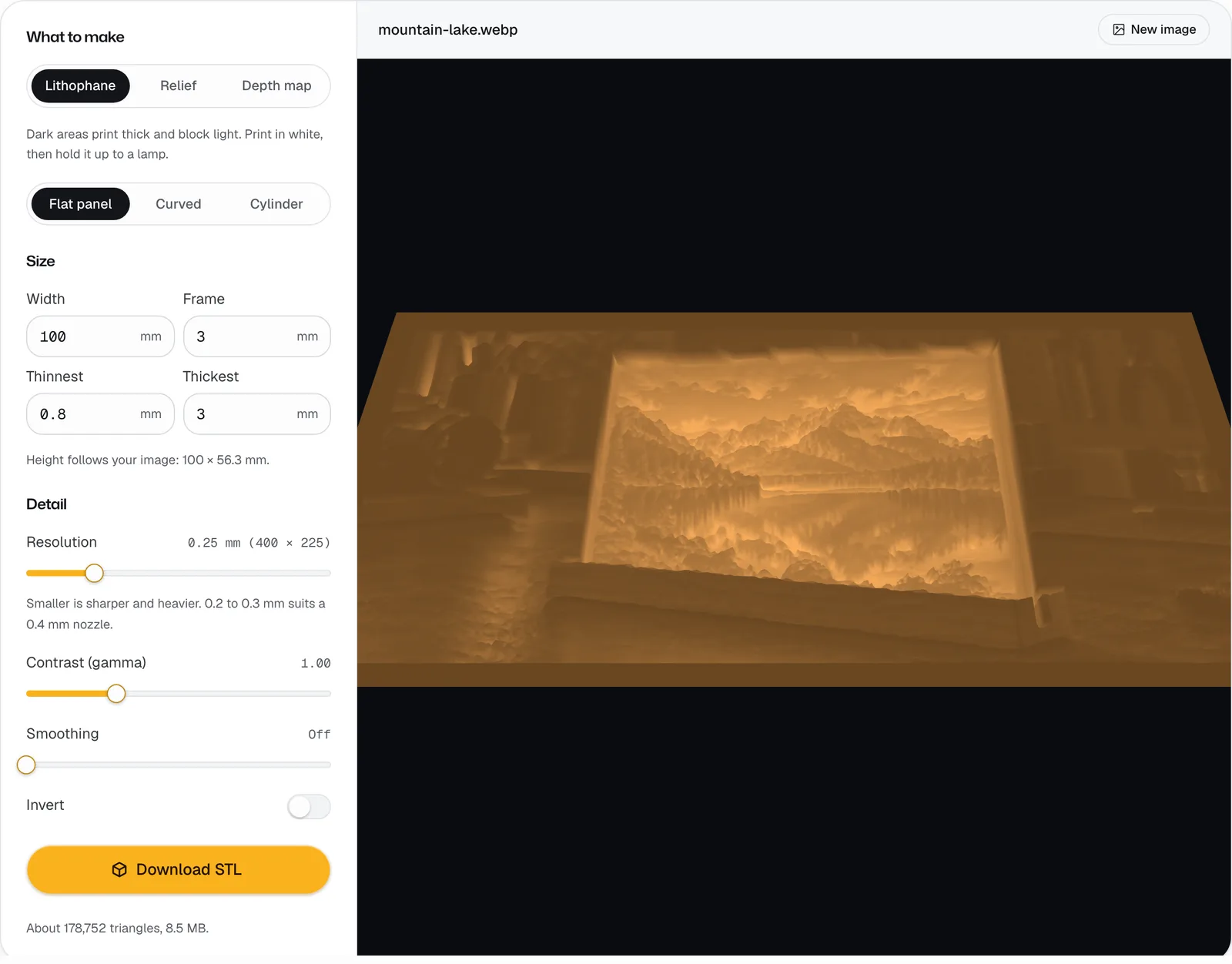
The free lithophane maker makes three shapes:
- Flat panel: for a frame or a window.
- Curved: a panel that stands on its own, bent anywhere from 30 to 300 degrees.
- Cylinder: a closed tube with a smooth bore, for an LED puck or a tea light inside.
Curved and cylinder files come out standing upright, ready to slice.
Size and thickness
Start from the tool's defaults: 100 mm wide, 0.8 mm at the thinnest, 3 mm at the thickest, with a 3 mm frame. An ornament works at 60 to 80 mm wide and a desk gift at 100 to 150 mm. For a lamp, pick Cylinder and enter the circumference instead of the width. The tool shows the bore it will make, so make it a little wider than the light: 258 mm gives an 82 mm bore for an 80 mm puck light.
The tool reads your photo at up to 1,600 pixels on its long side, so a bigger file adds nothing. Crop tight on the face or the pet before you load it.
Print settings
- Filament: white PLA. Prusa's lithophane guide recommends a light colour, "ideally white".
- Infill: 100 percent, so no infill pattern shows through the light. Bambu Lab's lithophane guide sets infill to 100% Rectilinear.
- Layers: thin. Bambu Lab suggests 0.08 to 0.12 mm for lithophanes, and Prusa's guide uses 0.10 mm.
- Orientation: makers split on this. Upright gives the most detail, because the nozzle draws the picture on every layer, but it needs a brim. Prusa prints flat "to prevent any kind of wobble", which is easier for small panels.
The full method, including how to fix a print that comes out too dark, is in how to make a lithophane. For the lamp build, see lithophane lamp.
2. A name sign or desk plate
The free 3D text generator turns a name into raised letters on a plate. Pick one of 17 bundled fonts, or load your own TTF, OTF or WOFF file (WOFF2 is not read). The defaults already make a good desk plate: capital letters 15 mm tall, raised 2 mm on a 2.4 mm rectangle with a 5 mm margin. Letter size runs from 3 to 1,000 mm. To sink the name into the plate instead, switch on Engrave into the base.
Two colours with one filament change
Raised letters on a plate print in two colours on a single-nozzle printer. Print the plate in one colour, then add a filament change in your slicer at the first layer above it: 2.4 mm with the default plate. The printer pauses, you swap the spool, and the letters print in the second colour. Prusa's colour change guide shows where to add it in PrusaSlicer.
The 3MF download keeps one object per colour, ready for Bambu Studio, OrcaSlicer or PrusaSlicer, so you can give each colour its own filament in the slicer. Multicolor 3D printing compares every way to print in colour, with the waste each one makes.
3. A name keychain
The same 3D text generator makes keychains. Switch on the Keychain tab option and it adds a tab on the left, top or right, with a ring hole from 2 to 15 mm (4 mm by default). An Outline base follows the letters at a set distance, like a sticker border, which suits a single name. It needs no account.
For ready-made plate shapes, the keychain generator in Depthue Studio puts up to 24 characters on a rounded, pill, circle, dog tag or heart plate, with raised or engraved letters. Studio needs a free account, and every action in it uses credits from the free plan's 50 a month.
4. A QR plaque that opens a video message
A QR code holds a link, so the gift can be a recorded message: a video from the whole family, a playlist, a wedding album. The free 3D QR code generator makes the plate. It does not host anything.
Put the video online first
Upload the video somewhere that gives you a link, and pick a place you expect to keep, because the plaque will outlast a link that changes. Then paste the link into the generator. For a host gift, choose Wi-Fi instead and type the network name and password, so guests scan the plaque to join. Text, contact cards, email addresses and phone numbers work too.
Size it so it scans
Each small square in the code is a module. The generator warns when modules drop below about 1 mm, because a 0.4 mm nozzle cannot print clean squares smaller than that. DENSO WAVE, the company that invented the QR code, says the larger the module, the more stable it is to read, and asks for a clear margin four modules wide on every side.
- The print defaults are a 60 mm plate, 1.6 mm thick, with the code raised 0.8 mm and error correction level Q, which can recover about 25 percent of the code.
- The default quiet zone is 2 modules, and the plate's own margin adds to it. Keep that border free of text and decoration so the full margin stays clear.
- The generator reads the code back in your browser and shows "Scans in this browser" or "Did not scan here". Test the first printed plate with two phones before you print more.
Change colour at the right layer
Print the plate and the code in two contrasting colours. The generator tells you where to swap: with the default 1.6 mm plate and 0.2 mm layers it reads "Change filament at Z 1.60 mm, the start of layer 9". The two-colour 3MF keeps the plate and the code as separate parts, so Bambu Studio, OrcaSlicer and PrusaSlicer can give each its own filament.
5. A 3D map of a place that matters
Where they met, the town they grew up in, a mountain they climbed. The free 3D map generator finds a place by name or coordinates and builds a terrain model from real elevation data:
- Area: a square from 1 to 300 km a side, centred on the place. The default is 20 km.
- Model: 40 to 300 mm wide (120 mm by default) on a 1 to 10 mm base (3 mm by default).
- Height: exaggerated 1.5 times by default, with sea level printed flat.
Terrain needs height to show. A flat town prints almost flat, so raise the exaggeration or widen the area until the 3D preview shows the hills, then download the watertight STL. It prints in one colour. The same tool exports a 16-bit height map PNG if the gift goes to a CNC or a laser instead.
6. A photo relief of a pet or a face
A relief is the opposite of a lithophane: the photo rises out of a solid plate, and you see it by the light falling across its surface. Make one in the free depth map generator. It runs the Depth Anything V2 model in your browser, turns the photo into a grayscale depth map (white raised, black deep), previews the relief in 3D and downloads it as an STL. Nothing is uploaded. If you already have a depth map, the image to STL tool turns it into a relief in its Depth map mode.
For a batch of pet portraits, coins and medals, or touching up the depth with a brush, DepthGen Pro does the same work offline on your own computer, for $49.99 once.
7. A Gridfinity drawer set for the tinkerer
For the person who already owns a printer, or a toolbox. Gridfinity is a 42 mm grid system: baseplates that sit in a drawer, and bins that sit on them and stack.
- Measure the inside of their drawer.
- Enter it with your printer in the free Gridfinity layout tool. It works out the grid, the gaps, the tallest bin that fits and how to split the baseplate into pieces that fit your bed, each as an STL.
- Make the bins in the Gridfinity generator: up to 10 grid units each way and 2 to 20 height units of 7 mm, with dividers, a label shelf and magnet or screw holes.
- If you add magnets, the Gridfinity specification uses magnets 6 mm across and 2 mm thick.
Every number is explained in Gridfinity dimensions.
8. Two-colour ornaments for the tree
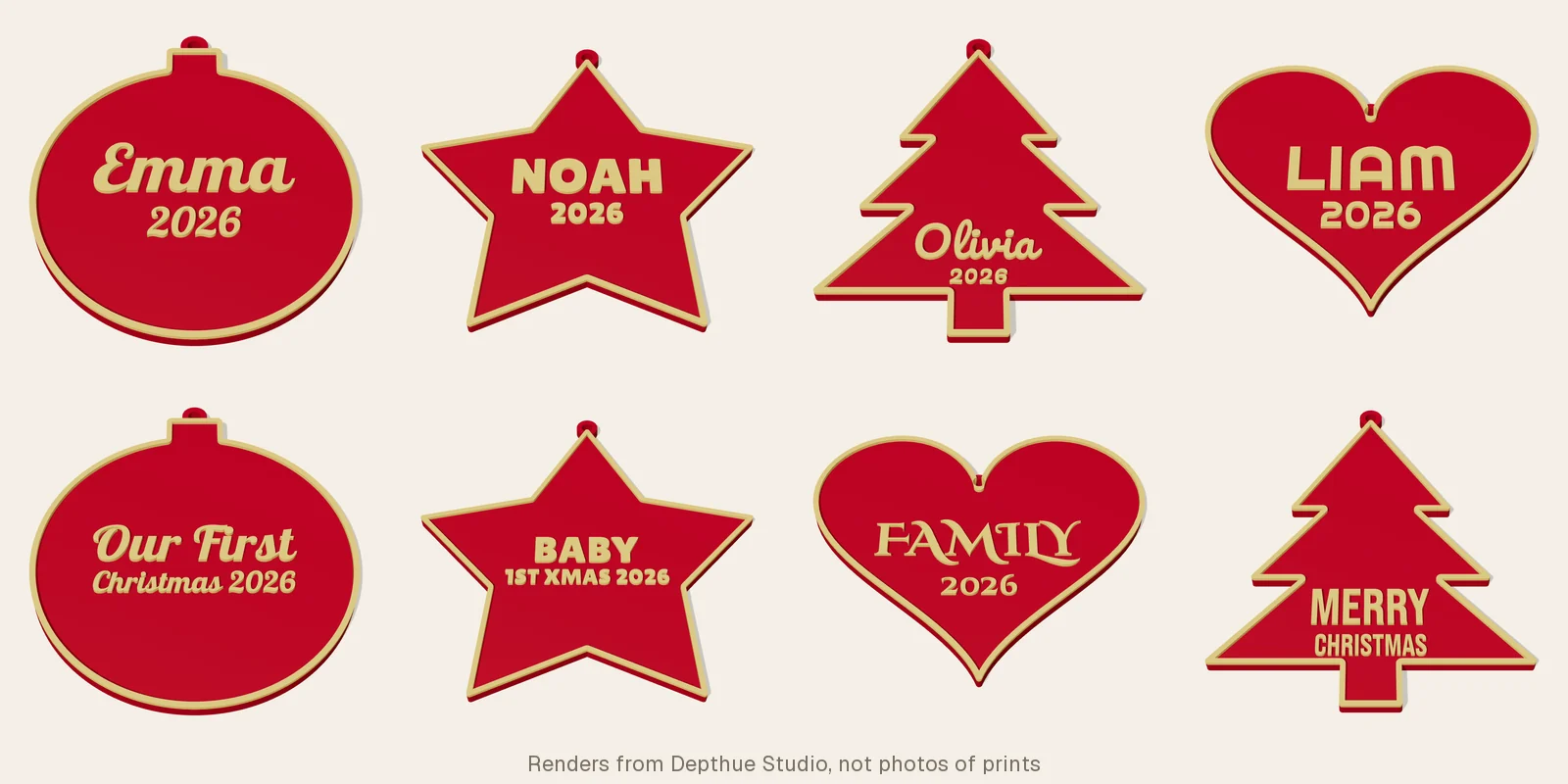
Depthue has eight free two-colour ornaments on Printables, each as an STL and a 3MF: four carry a name and four a greeting. Every one is a 3 mm plate with the lettering and rim raised 1 mm on top, so one filament change above 3.0 mm prints them in two colours. The files, the colour change and how to make one with your own name are in 3D printed Christmas ornaments.
Finish it so it looks bought
A December 2025 thread on r/3Dprinting asked a question many gift makers have: "Do they think my gift is cheap? or of poor quality?" The answers are worth keeping. They are opinions from makers in that thread.
- The top reply: "By default, printed items will always 'look' poor quality compared to wood. Heck, poor quality wood items can 'look' expensive just by sanding, staining, and clear coating."
- On weight: "Adding weight will give it a premium feel."
- On settings: "give it a couple extra walls and a touch of fuzzy skin, it makes a HUGE difference."
- One maker painted a custom sign and mounted it on a bourbon barrel lid: "It was personal and we did more than just print out a file."
The ideas above already cover the personal part: a name, a face or a place. The finish is the rest.
Before you print a batch
Print one first and check it in your hand. If you are making several, drop the STL into the free 3D print cost calculator for the grams, the print time and the cost of each one.
Selling them? Files you make with Depthue's free tools may be used commercially. Models you download from other sites follow their own licence.
Frequently asked questions
What are the best 3D printed gifts?
Gifts made from the person: a photo lithophane, a name sign or keychain, a QR plaque that opens a recorded message, or a 3D map of a place they love. Each one takes one free tool and one print.
What is a good 3D printed gift for a beginner to make?
A name plate or a QR plaque. Both are flat plates that print without supports, the tools set every size in millimetres, and the QR generator tells you the exact layer to change colour.
What filament is best for 3D printed gifts?
PLA for most gifts. For a photo lithophane, use white PLA at 100 percent infill: Prusa recommends a light colour, ideally white, and Bambu Lab sets lithophane infill to 100 percent.
How do I make a photo lithophane gift?
Load the photo into the free lithophane maker, pick a flat, curved or cylinder shape, and start at 100 mm wide with 0.8 to 3 mm thickness. Print it in white PLA at 100 percent infill with layers of 0.08 to 0.12 mm.
Can a 3D printed QR code play a video message?
Yes, if the video is online. Upload it somewhere that gives you a link, put the link into the QR code generator, and print the plate in two contrasting colours with modules of at least 1 mm. Depthue does not host the video.
How do I print a name in two colours without an AMS?
Make the name as raised letters on a plate, then add one filament change in your slicer at the first layer above the plate. The printer pauses, you swap the spool, and the letters print in the second colour.
How do I make a 3D printed gift look less cheap?
Personalise it, then finish it. Makers on r/3Dprinting point to sanding and paint, added weight, a couple of extra walls with fuzzy skin, and mounting the print on wood.
Do I need an account or to upload my photos?
Not for the free tools: they run in your browser and nothing is uploaded. The keychain generator in Depthue Studio needs a free account.
Can I sell the gifts I make?
Files you make with Depthue's free tools may be used commercially. Models you download from other sites follow their own licence.
Sources
- Bambu Lab Wiki, CMYK Lithophane Printing Guide (infill 100% Rectilinear)
- Bambu Lab Store, PLA CMYK Lithophane Bundle (layer heights 0.08 to 0.12 mm)
- Prusa Blog, From 2D to 3D: How to turn a picture or a photo into a 3D model (2018)
- Prusa Knowledge Base, Color change
- DENSO WAVE, QR Code: margin (quiet zone)
- DENSO WAVE, QR Code: module size
- Gridfinity specification (magnets)
- r/3Dprinting, Do they think my gift is cheap? or of poor quality? (December 2025)