How to Make an STL File: 6 Ways, From Scratch or From What You Have
How to make an STL file for 3D printing for free: model it, build it from settings, turn a photo, logo or text into one, convert a CAD file, or use AI.
By Depthue Lab4 min read
To make an STL file, build a 3D model and export it as STL. Any 3D program can do it, and for many everyday parts you do not need to model anything: a generator builds the part from a few settings, and a converter turns a photo, a logo, text or a CAD file into an STL in your browser.
An STL is only a list of triangles that wrap a solid, measured in millimetres for 3D printing. It has no colours, no units field and no design history, which is why a slicer reads it so easily and why it is hard to edit later.
Pick the route by what you start with
| You have | Fastest route | Free tool |
|---|---|---|
| Nothing, a part in your head | Model it | Tinkercad, Depthue Studio, Fusion, FreeCAD, Blender |
| A few numbers: a box, sign, gear or bin | A part generator | Studio parts, gear generator, Gridfinity generator |
| Text or a name | Text to STL | Text to STL |
| A photo or a logo | Image to STL | Image to STL, SVG to STL |
| A CAD file (STEP, STP, IGES) | Convert it | STEP to STL |
| A description or a picture of an object | AI image or text to 3D | Meshy, Tripo (free tiers) |
1. Model it from scratch
Use a modelling program and export the finished part with File, Export, STL or the program's equivalent.
- Tinkercad (free, browser): stack boxes, cylinders and text, mark some as holes, group them. The easiest start.
- Fusion, Onshape or FreeCAD (parametric CAD): sketch with exact dimensions and extrude. Best for parts that must fit something. Fusion's free licence is for personal use only.
- Blender (free, desktop): sculpting and organic shapes. Its STL export is built in; check the scale before exporting, since Blender's default unit is the metre and an STL stores no units.
- Depthue Studio (free, browser): primitives, solid text and booleans, plus every edit an existing STL might need, with print checks before you export.
The comparison of 3D modelling software for 3D printing covers each one, its price and its limits.
2. Build it from settings
Many printed parts are the same shape at a different size: a box, a sign, a keychain, a gear, a drawer bin. A generator asks for the numbers and builds a closed solid.
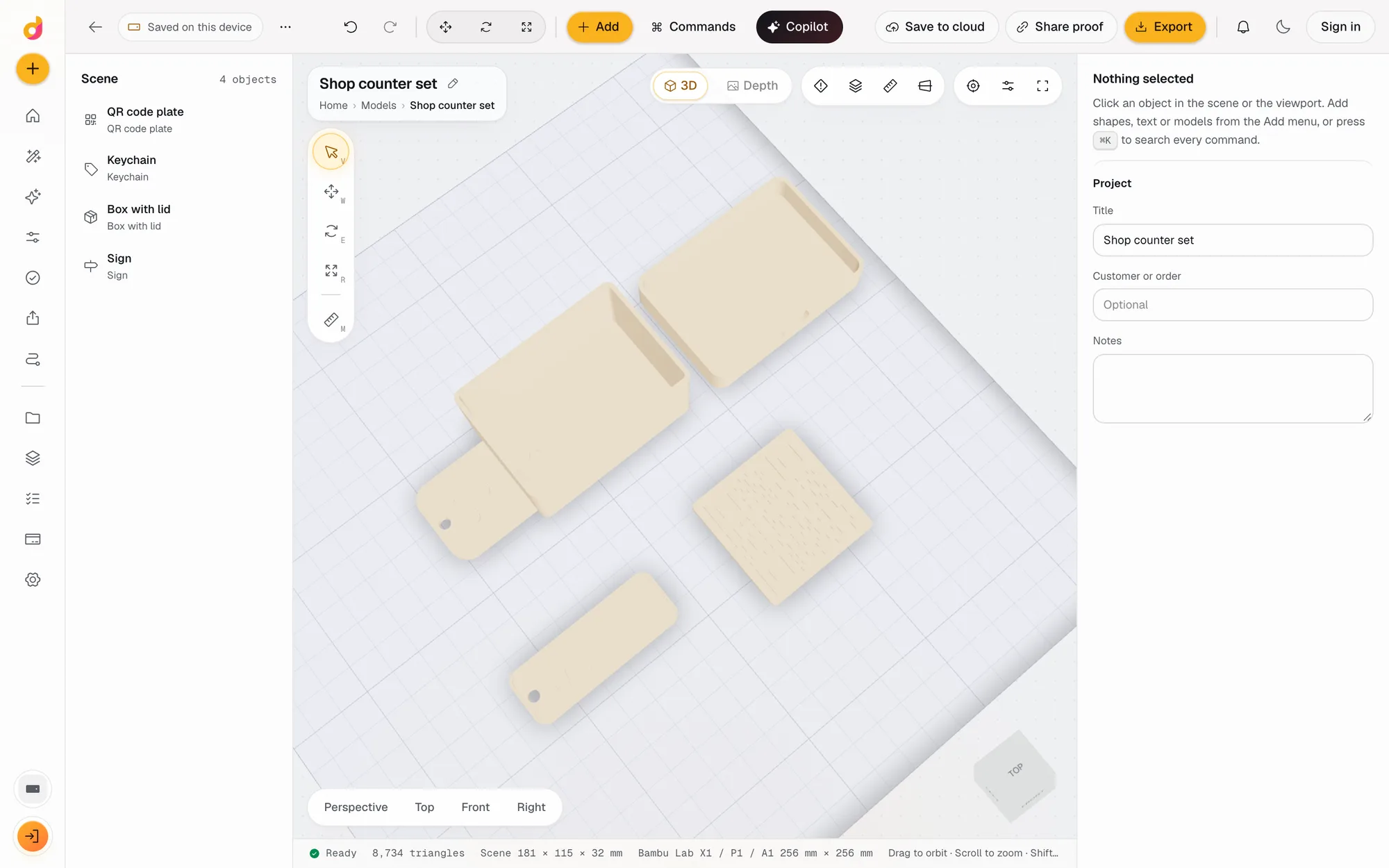
In Depthue Studio the parts are a keychain, a sign, a box with lid sized from the inside, a vase, a QR code plate, an involute gear and Gridfinity bins and baseplates to the 42 mm standard. Change a number and the part rebuilds, then export STL or 3MF. When the part you need is not in the list, the scripted part builds one from a few lines of JavaScript.
3. Turn text into an STL
Type the text, pick a font and a height, and download. The text to STL tool makes solid letters, with or without a base plate, in your browser. For a name sign with holes or a keychain with a ring, use the Studio parts above.
4. Turn a photo or a logo into an STL
There are two kinds of result, and it pays to choose first:
- A relief, raised from a flat back: signs, plaques, coins, lithophanes and wall art. Image to STL turns a photo's brightness, or an AI depth map, into height. For a logo, SVG to STL or PNG to STL extrudes the shapes cleanly.
- A full 3D object, front and back: a figure from one photo. That needs AI image to 3D (section 6).
For most photos the relief is the better print. The guide to making a 3D model from an image explains when each one fits.
5. Convert a CAD file
If someone sent you a STEP file, open it in the STEP to STL converter. It reads STEP and IGES with OpenCascade in your browser, keeps each solid as its own part, and writes STL or 3MF in millimetres. Other formats convert too: OBJ to STL, 3MF to STL and GLB to STL.
If you have the CAD program, export from it directly; it knows the exact geometry and lets you set the mesh resolution.
6. Generate it with AI
AI image to 3D and text to 3D tools build a complete mesh from one picture or a sentence. Meshy and Tripo both export STL on their sites, and both have free monthly credits. Two cautions: the hidden sides of an object are invented, and free-tier licences differ, so read the terms before selling prints.
AI output is best for figures, toys and decorations. For a bracket or a lid that must fit, a generator or CAD will be exact where AI is approximate.
Check the STL before you print
Whatever made the file, check three things:
- Size. Open it in the STL viewer and read the width, depth and height. A part 1,000 times too small was exported in metres.
- Closed surface. The mesh must be watertight, with no open edges. STL repair checks the edges and closes small holes.
- Resolution. Curves are made of flat triangles. If you can see facets on a round part, export again with a finer mesh setting.
The STL checker in Studio goes further: it measures the thinnest wall, flags overhangs and checks the part fits your printer's plate. To fix a file that fails, see how to fix STL files.
Free tools for this job
Frequently asked questions
How do I make an STL file for free?
Model the part in a free program such as Tinkercad, Blender, FreeCAD or Depthue Studio and export it as STL. For simple parts there are faster routes: text to STL for lettering, image to STL for a photo or logo, and ready-made generators for boxes, signs, gears and Gridfinity bins.
Can I make an STL file without 3D modelling skills?
Yes. Generators build a part from settings you type, such as a box from its inside size or a sign from its text. Converters turn a photo, an SVG logo or a QR code into a printable STL in the browser, with no modelling at all.
How do I turn a picture into an STL file?
For a flat relief, lithophane or sign, use an image to STL converter: it turns brightness or a depth map into height. For a full 3D figure, an AI image to 3D generator builds the whole shape, and the result usually needs a check and a flat base before printing.
How do I convert a CAD file to STL?
Export it as STL from the CAD program, or, if you only have the STEP file, convert it with a STEP to STL converter. STEP stores exact curves; the STL is a triangle mesh fine enough that the difference does not show in a print.
What makes an STL file printable?
It has to be a closed solid with no holes in the surface, at the right size in millimetres, with walls thicker than about two nozzle widths. Most problems are open edges or the wrong units, and both are quick to check.
Can AI make an STL file?
Yes. AI image to 3D and text to 3D tools such as Meshy and Tripo build a model from a picture or a description and export STL. They are best for figures and decorative objects; for parts that must fit, CAD or a generator is more exact.